

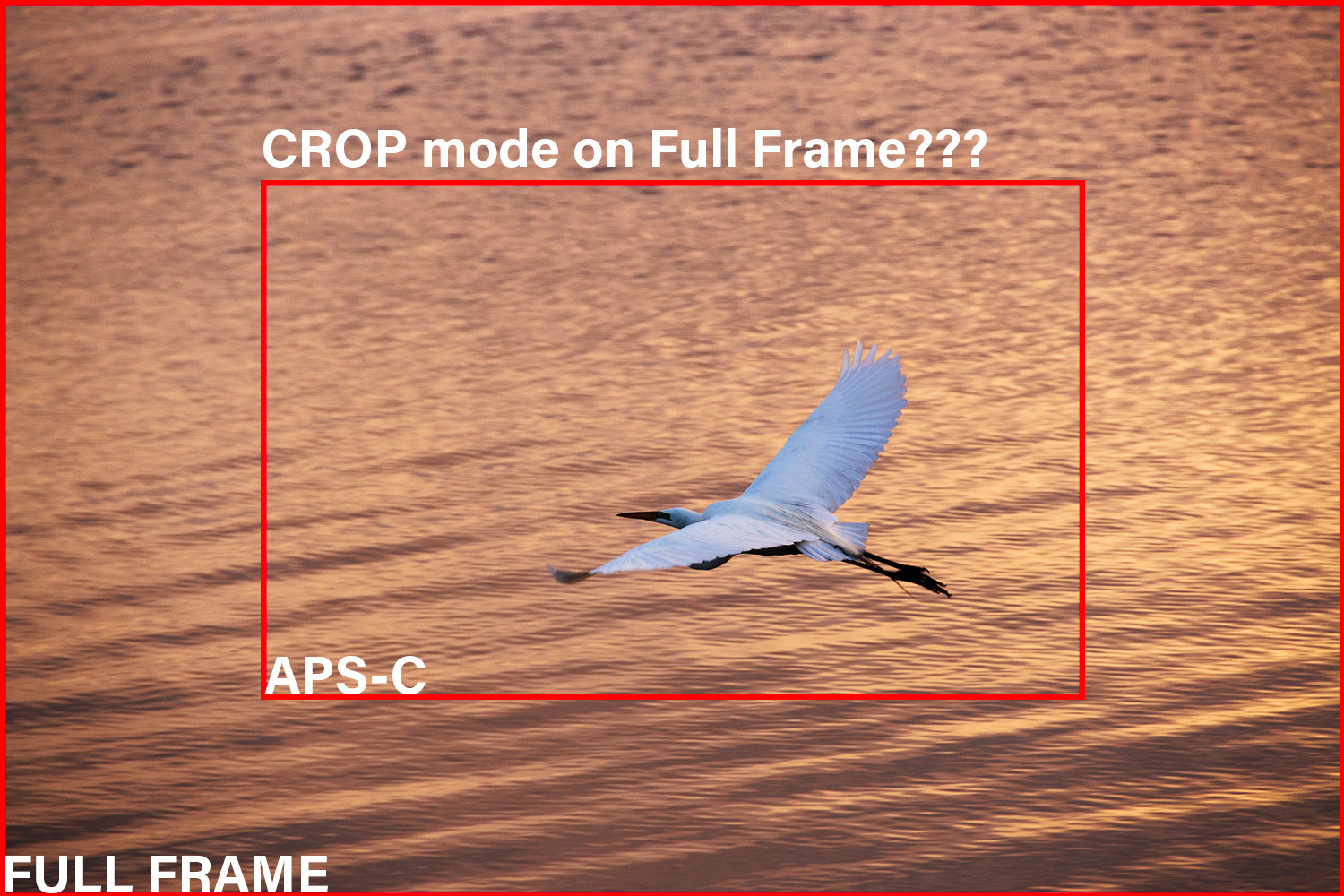
Now that I have explained the difference between crop sensors (sensors that are smaller than FF) and full frame sensors in this post Full Frame vs Crop, Which is Better? I can now talk about an interesting feature of full frame cameras which is that full frame cameras like the R5 can also shoot in crop format!! How do they accomplish this? It’s simple, the camera just doesn’t use the outside edges of the sensor and only uses the area in the center of the sensor that corresponds to the crop format chosen in the camera’s menu.
The R5 will actually shoot in 4 different crop modes or aspect ratios. It will shoot in a 4:3 aspect ratio which is a similar format to the standard 3:2 format of the full frame sensor just slightly less widescreen. It will shoot in 1:1 format which is a square format. It will shoot in 16:9 which is the widescreen standard for television screens, computer monitors, and most TV shows. And it will also shoot with a full APS-C crop. Take a look at the comparisons below to get more of an idea of how these different formats relate to each other.

You might be wondering why on earth you would want to use one of these crop modes. Obviously, the R5’s sensor can’t physically change size so how is this substantially different from just taking pictures with the normal 35mm Full Frame and cropping the image afterward? Well, it all comes down to making the photographer’s job easier. If you want to target a TV screen or computer screen background then shooting in 16×9 crop will make it that much more obvious how you need to frame your image to get the perfect shot. Or, imagine if you’re a director or working for a director and you’re scouting a location with a stills camera, then, the 16×9 crop translates directly to the framing that would be used by the actual production crew.
1:1 may seem like an odd aspect ratio to shoot at, but, it makes sense if you’re shooting for an Instagram account which is mostly square images. There also some kinds of picture frames that work best when the image is initially shot in 1:1 aspect ratio. Shooting in 1:1 could be a good format to try for headshots as most online profile photos have a square aspect ratio.
When using these alternate aspect ratios the RAW image remains unaffected. After opening the RAW files in Lightroom a crop will be automatically applied to the image but you can just remove the crop and voila, you’re back to having a full frame image again. If shooting JPG the final image is cropped and the 35mm full frame image can’t be recovered.
Since the RAW file retains the 35mm full frame image a different aspect ratio can be used as a bit of a cheat to help avoid framing mistakes. Say you’re the type who tends to shoot with a tilt or off to the right all the time, or maybe you tend to shoot with the subject low or high and cut off people’s feet. If you’re one of those types then using one of these alternate aspect ratios can force you to frame your images better.
The R5 can also shoot with a full APS-C crop. Below is a comparison of the full frame area vs the APS-C area.

If you’re far away from the subject, say a bird or other kind of wildlife, then shooting with an APS-C crop not only saves some file size but it can help the photographer get better framing for their final images. It also allows the R5 to work a little more seamlessly with other APS-C cameras if other people happen to be using those.
Despite all this, many if not most photographers will immediately ask why anyone would throw out all those pixels that they paid so much money for in a full frame camera. Well, they honestly have a good point and it’s why I rarely to never use APS-C crop on my camera. For one, while the APS-C crop does offer some logic, it’s really better to use a longer focal length to achieve precise framing. On the R5 a full APS-C crop is still 17.2 megapixels which isn’t too far off from actual crop sensor cameras that are often around 24 megapixels. But it is a far cry from the 45 megapixels of the R5’s full frame sensor. Bottom line: going to APS-C on the R5 throws out more than half the resolution and that would be true with any FF camera that offers the ability to shoot in crop mode.
I can see some reasons to shoot in crop mode on a full frame camera but they’re usually corner cases and usually professional use cases and not amateur use cases. Pro’s who want to avoid framing mistakes may use the different aspect ratios to force themselves to leave space where they tend to shoot too close. But, as for using the full APS-C crop on an R5: it’s more of a bad thing to do than a good thing.
